Modern SCADA systems are no longer limited to displaying process values, alarms and trends. Industrial automation applications increasingly require customized logic, automatic procedures, data processing and integration between different parts of the supervision system.
What Is Code Builder in Winlog Evo SCADA?
Code Builder is the integrated programming environment provided by Winlog Evo for extending and customizing SCADA applications.
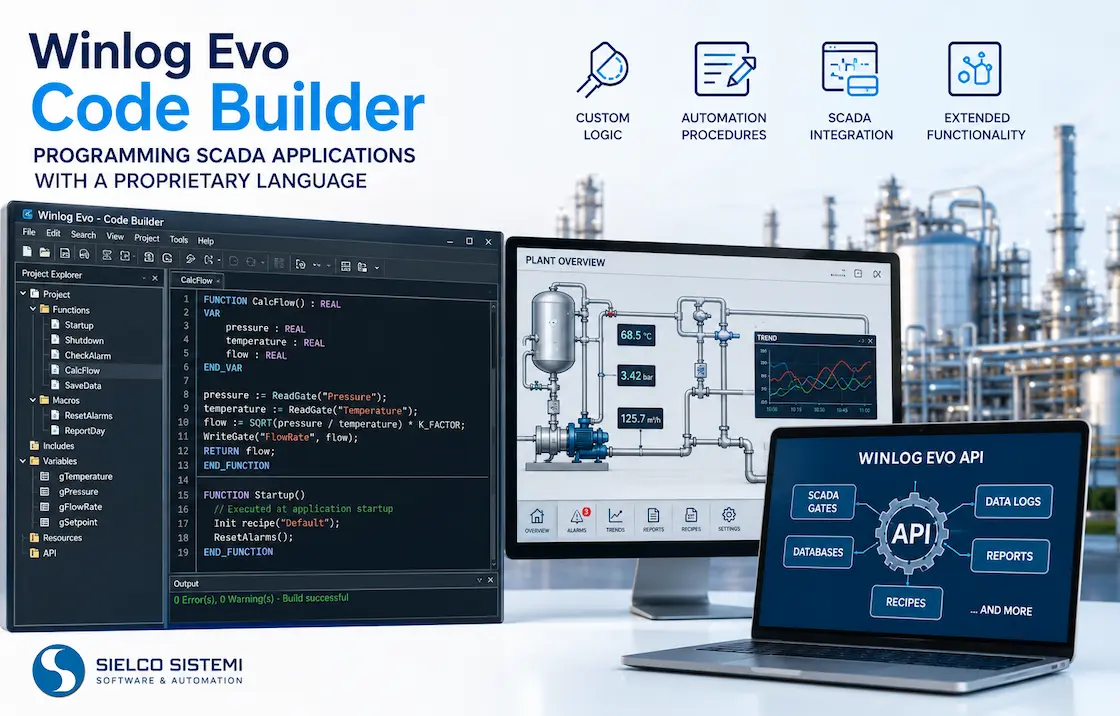
It provides a dedicated programming language that allows developers to create procedures and functions and interact with elements of the Winlog Evo application. The environment also provides access to API functions and syntax-checking tools.
This makes Code Builder an important tool for SCADA application development and customization.
Discover Winlog Evo Development Tools
Why Use a Programming Language Inside a SCADA System?
Every industrial automation project has application-specific requirements. Standard SCADA configuration provides communication, visualization, alarms, historical data and reporting, but individual plants can require additional procedures that cannot be implemented only by configuring graphical objects.
Calculate derived process values.
Implement specific control sequences.
Monitor several conditions simultaneously.
Read and modify SCADA tag values.
Manage recipes and production procedures.
Read or write files.
Interact with databases.
Generate reports and perform calculations.
Implement automatic procedures.
Code Builder makes it possible to implement this application-specific logic directly inside the Winlog Evo project.
A Programming Language Designed for SCADA Applications
Code Builder is designed specifically for programming within the Winlog Evo SCADA environment. The language includes fundamental programming concepts such as variables, functions, expressions, conditions and loops.
The documented basic types include int, unsigned, real, bool and string. The language also provides function calls, assignments, return values, If...Then...Else, For...Next, While and Do...While.
Creating Custom Functions and Procedures
A key feature of Code Builder is the ability to create custom functions. A function can have a return value, a name, parameters, directives, local variables and a sequence of instructions.
This structure allows developers to organize complex SCADA logic into reusable procedures rather than duplicating the same code throughout an application.
Automatic SCADA Procedures with Code Builder
Code Builder functions can be associated with different execution modes. The documented directives include #Macro, #Startup, #Shutdown and #Modal.
A Startup function is executed when Runtime starts and can be used for cyclic checks or automatic actions. A Shutdown function is executed when Runtime closes, while Macro functions can be made available to the operator.
These features make Code Builder suitable for developing automatic SCADA procedures.
Accessing SCADA Tags from Code
One of the most important characteristics of the Winlog Evo programming environment is direct interaction with SCADA tags, known in Winlog as gates.
The API provides functions for reading and writing numerical, digital and string gates, together with functions for working with other properties and application elements.
For example, functions such as GetNumGateValue() and SetNumGateValue() can be used to read and modify numerical gate values.
A Rich API for SCADA Application Development
The programming language is complemented by the Winlog Evo API. The Code Builder documentation organizes API functions into several areas, including:
Bit operations
Data logs
MySQL/MariaDB and SQLite databases
Date and time
Devices
Directories and files
SCADA gates
Historical files
Internet and FTP
Mathematics
Multilanguage support
Recipes
Reports
SMS
Strings
Templates and template objects
Users and groups
Code Builder is therefore more than a simple calculation scripting facility: it provides a programming layer for customizing Winlog Evo applications.
Database, Files, Reports and Recipes
The API includes functions for applications that need to exchange information with external data sources. The documented database functions include MySQL/MariaDB operations such as connection management, transactions, SQL statements, parameter binding and result retrieval.
Code Builder also provides functions for file management, data logs, historical data, reports and recipes. Recipe functions can create, delete, import and execute recipes, allowing application logic to interact programmatically with recipe management.
Programming Conditions and Cycles in SCADA Logic
Industrial applications frequently require repetitive operations and conditional logic. Code Builder supports If...Then...Else conditions and several types of loops.
For...Next can repeat instructions for a defined range, while While and Do...While can execute instructions repeatedly while a condition remains valid.
Because Code Builder code has high priority within the application, long or infinite loops can affect application responsiveness. The Winlog documentation recommends using Sleep() inside long loops so Runtime can continue handling other application activities.
An Integrated SCADA Development Environment
Code Builder is integrated into the Winlog Evo Project Manager. Developers can work with project code files using an editor that provides syntax highlighting, search and replacement, bookmarks and other development tools.
The environment includes commands for inserting API functions and language structures directly into code. Syntax checking can be performed on the current file or across project files.
Why Code Builder Is Useful for Winlog Evo Developers
The main advantage of Code Builder is the ability to combine visual SCADA development with procedural programming.
Winlog Evo development tools can be used together: process variables can be defined, graphical supervision pages can be created, and Code Builder can implement the application logic connecting these elements.
This approach keeps application-specific programming logic inside the Winlog Evo SCADA project.
Conclusion: Flexible SCADA Programming with Winlog Evo
Winlog Evo Code Builder provides developers with a practical way to add custom programming logic to SCADA applications.
Its proprietary programming language includes variables, functions, conditions, loops and expressions, while the API provides access to gates, devices, files, databases, historical data, reports, recipes, templates, users and other Winlog Evo functions.
For SCADA application developers, this means that Winlog Evo can go beyond standard configuration and visualization. Custom procedures can be created to implement the specific requirements of a machine, process or production plant.
Code Builder therefore represents an important part of the Winlog Evo development environment: a programming layer that allows the SCADA application to be adapted to the specific needs of industrial automation projects.