SCADA Remote Access: How Winlog Puts Your Plant in Your Pocket
Sielco Sistemi —
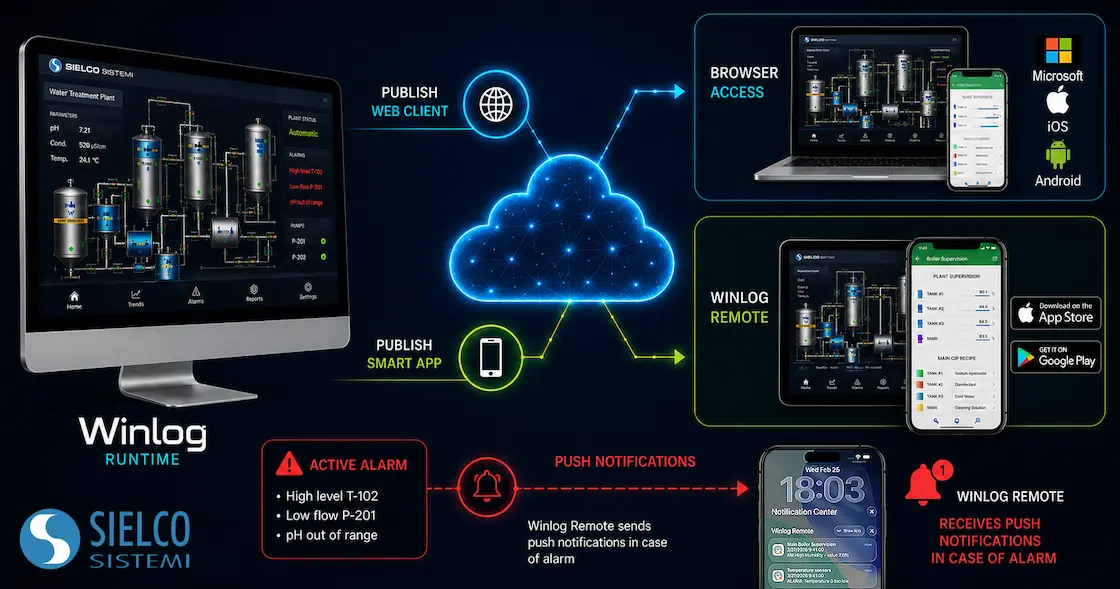
Industrial operators no longer need to be standing in front of a control room panel to know what is happening on the plant floor. SCADA remote access has become a core requirement for modern supervisory systems, allowing engineers, maintenance teams and plant managers to monitor processes, acknowledge alarms and adjust setpoints from anywhere with an internet connection. Winlog, the SCADA/HMI software platform developed by Sielco Sistemi, addresses this need with three complementary tools for remote access to Winlog, designed to bring secure, real-time supervision to any browser or mobile device.
Why SCADA Remote Access Has Become Essential
Distributed plants, unmanned sites and hybrid work schedules have made remote SCADA monitoring a practical necessity rather than a convenience. A maintenance technician on call needs to check an alarm at 2 a.m. without driving to the site; a plant manager overseeing multiple facilities needs a single point of visibility across all of them. Traditional HMI terminals tied to a single workstation cannot meet these expectations. This is exactly the gap that remote HMI access solutions are built to close, and it is why Sielco Sistemi designed Winlog around a flexible, browser- and app-based architecture from the ground up.
Three Ways to Access Winlog Remotely
Winlog takes advantage of modern web technologies (HTML5, JavaScript and CSS) to provide secure encrypted HTTPS communication, user authentication and access control managed through user groups defined directly in the Project Manager. Instead of a single generic client, Winlog offers three purpose-built access methods, each optimized for a different use case: Winlog Remote, the free mobile app; Smart App, the mobile-optimized browser interface; and Web Client, the full-featured desktop browser interface. A live demo server is available so that prospective users can test every remote access functionality before deploying it on a real project.
Winlog Remote: Free Mobile SCADA Monitoring for iOS and Android
The newest addition to the Winlog remote access family is Winlog Remote, a free native mobile application available for both iOS and Android. Unlike a browser-based interface, Winlog Remote lets users organize and store multiple SCADA servers, save several user profiles per server, and switch between plants in seconds. This makes it particularly suited to system integrators, service technicians and managers who need to keep an eye on several installations from the same device. Winlog Remote provides real-time monitoring, interactive process control and, critically, push alarm notifications, so operators are alerted the moment a critical event occurs rather than discovering it during the next scheduled check. For SCADA vendors and integrators, a free companion mobile app is quickly becoming a baseline expectation, and Winlog Remote positions Winlog competitively alongside the remote-access offerings of other major HMI/SCADA platforms.
Smart App: A Mobile-Optimized Interface Without Installing Anything
For teams who prefer not to install a dedicated app, Winlog Smart App delivers a mobile-optimized web interface built with HTML5. Because it is hosted directly by the Winlog application running on the supervision station, users simply type the server’s IP address or hostname into a mobile browser (Safari, Chrome, Firefox) to reach the SCADA system instantly, with no client software to download. Applications are built using the interactive Smart App Builder, which structures the interface as a menu of sections, elements and sub-elements mirroring the physical or logical layout of the plant. Access can be restricted per user group, multiple clients can connect to the same server simultaneously, and reports generated by Winlog (CSV, PDF) can be reviewed remotely as well.
Web Client: Full HMI Access From Any Browser
Winlog Web Client extends the same philosophy to desktop and laptop users, offering full HMI functionality through any standard browser. Built with the Template Builder development tool, Web Client supports the complete range of graphical objects used in Winlog projects, including frames, buttons, gauges, historical trend charts and alarm/event views. As with Smart App, Web Client relies on HTTPS-encrypted communication, per-user-group access rights configured in Runtime, and support for multiple simultaneous client connections, making it suitable for control rooms, engineering offices and remote monitoring desks alike.
Security and Access Control at the Core of Remote SCADA Access
Opening a supervisory system to remote connections inevitably raises questions about industrial cybersecurity. Winlog addresses this by encrypting all client/server traffic over HTTPS and by enforcing authentication and authorization at the user-group level for every access method: Smart App, Web Client and Winlog Remote alike. Administrators define exactly which functions each group of users can view or operate, ensuring that remote convenience never comes at the expense of operational safety. This approach aligns with general best practices for SCADA systems, where access segmentation and encrypted communication are considered fundamental safeguards against unauthorized control of industrial processes.
Choosing the Right Remote Access Method for Your Application
The three options are not mutually exclusive, and most Winlog installations end up using a combination of them. Winlog Remote is the natural choice for maintenance staff who need fast, app-based access with push notifications across multiple sites. Smart App suits operators who need mobile access to a single plant without installing anything. Web Client is best for control-room and office scenarios where a full desktop-style HMI experience is required. Because all three connect to the same underlying Winlog Server application, and licensing is managed through the standard Winlog license structure, integrators can mix and match access methods without duplicating development effort. For advanced remote maintenance scenarios that go beyond supervision, Winlog also offers SecureBridge, a dedicated remote maintenance tool for RDP, PLC programming and file transfer sessions.
Get Started with Remote Access to Winlog
Whether the goal is monitoring a single production line or supervising a network of distributed plants, Winlog’s remote access tools give engineering teams the flexibility to stay connected to their SCADA systems from a phone, tablet or browser, with the same security standards expected from an industrial platform. Explore the Winlog remote access page, try the live web demo, or download Winlog Evo to start building a supervisory application with remote access built in from day one.
FAQ
- What is SCADA remote access?
- SCADA remote access allows authorized users to monitor and control a supervisory system from outside the control room, using a browser or a mobile device over a secure, encrypted connection with user-based access control.
- What is the difference between Winlog Remote, Smart App and Web Client?
- Winlog Remote is a free mobile app for organizing and monitoring multiple SCADA servers with push notifications. Smart App is a mobile-optimized browser interface that requires no installation. Web Client is the full-featured desktop browser interface with complete HMI functionality.
- Is remote access to Winlog secure?
- Yes. All three access methods use encrypted HTTPS communication, user authentication, and access rights defined per user group directly in the Winlog Project Manager.
- Is the Winlog Remote app free to use?
- Yes, Winlog Remote is a free mobile app available on the App Store and Google Play, and it can connect to any Winlog Server application with an appropriate license.
- Can multiple users access the same Winlog SCADA server remotely at the same time?
- Yes, multiple clients can connect simultaneously to the same Winlog Server application, each with access rights defined by their assigned user group.